

In short
- You brief us once, then approve lists and messaging in your portal before anything goes live.
- Dedicated SDRs run LinkedIn outreach and handle every reply. You see every conversation.
- Your star ratings and call feedback decide who we target next.
A guaranteed number of appointments is only useful if you trust how they are produced. So rather than describe our process in general terms, this walkthrough shows the actual screens our clients use, with demo data, at every step.
Step 1: Sign the agreement and brief us
You start by signing the service agreement, which sets out exactly what counts as a delivered appointment, and then complete a short onboarding questionnaire. It covers your offer, your best customers, the buyer titles and company sizes you want, regions, exclusions, and the questions you want our SDRs to ask before booking a call.
Step 2: We build your audience
Our list team turns your brief into LinkedIn Sales Navigator searches. Each list is filtered by job title, seniority, function, industry, headcount, geography and recent activity, with your customers and competitors excluded. When we need data beyond LinkedIn, we enrich lists through Loopster. We also build lookalike audiences from your best existing clients.

Step 3: You approve the campaign
Your campaign appears in the portal as a set of tabs: Targeting, Invite, InMail and Reply playbook. You can open each Sales Navigator search, read six connection invite versions, follow ups and InMails, and see how we plan to answer common replies. Approve everything in one click, or request a change on a single message. We update it and send it back for approval.
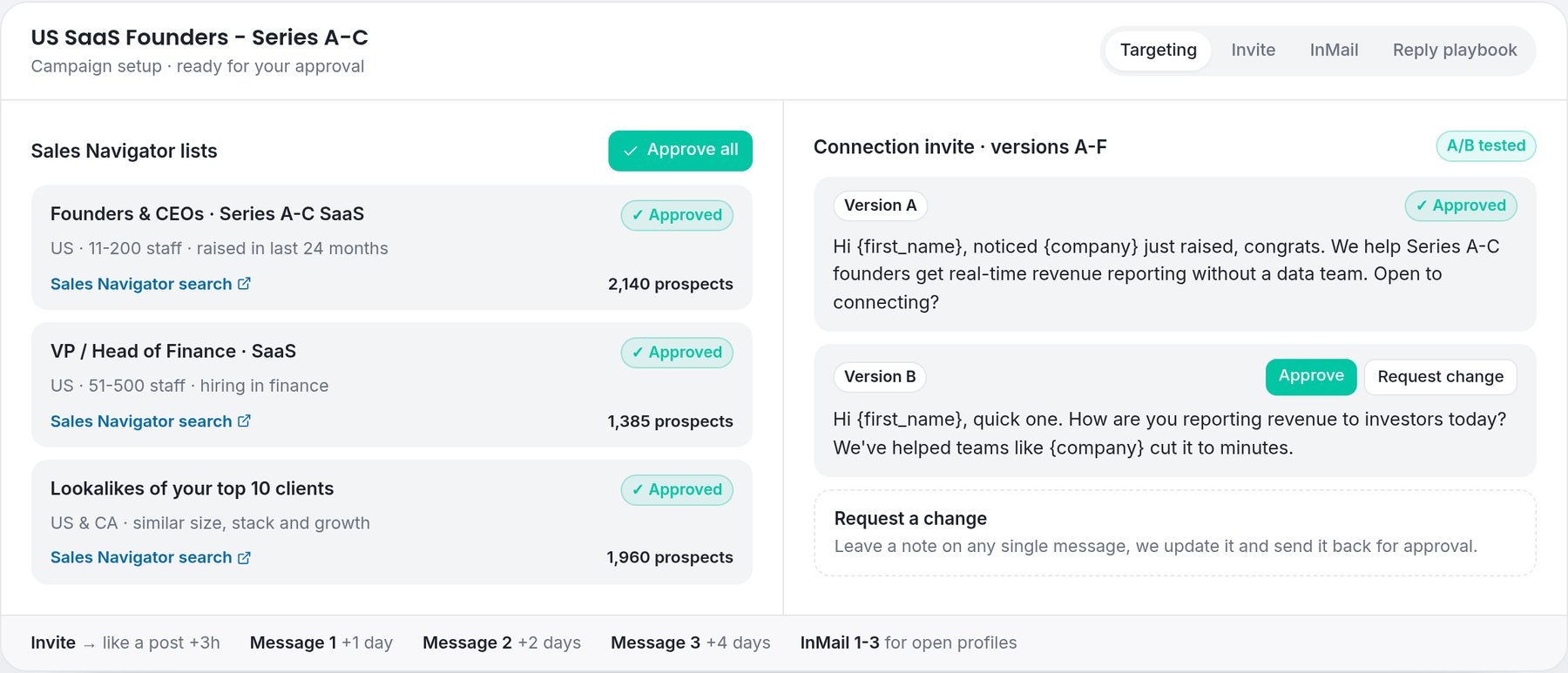
Nothing goes live until you approve it. You will never see a message sent in your name that you have not seen first.
Step 4: Dedicated SDRs run outreach on LinkedIn
Once approved, the campaign runs on a steady cadence: connection invite, a light engagement step, then up to three follow up messages spaced over the following days, plus InMails for open profiles. Dedicated SDRs on their own LinkedIn accounts handle every reply personally, answer questions, qualify the lead against your criteria and suggest a call when the fit is right.
Step 5: Watch it happen in your Inbox
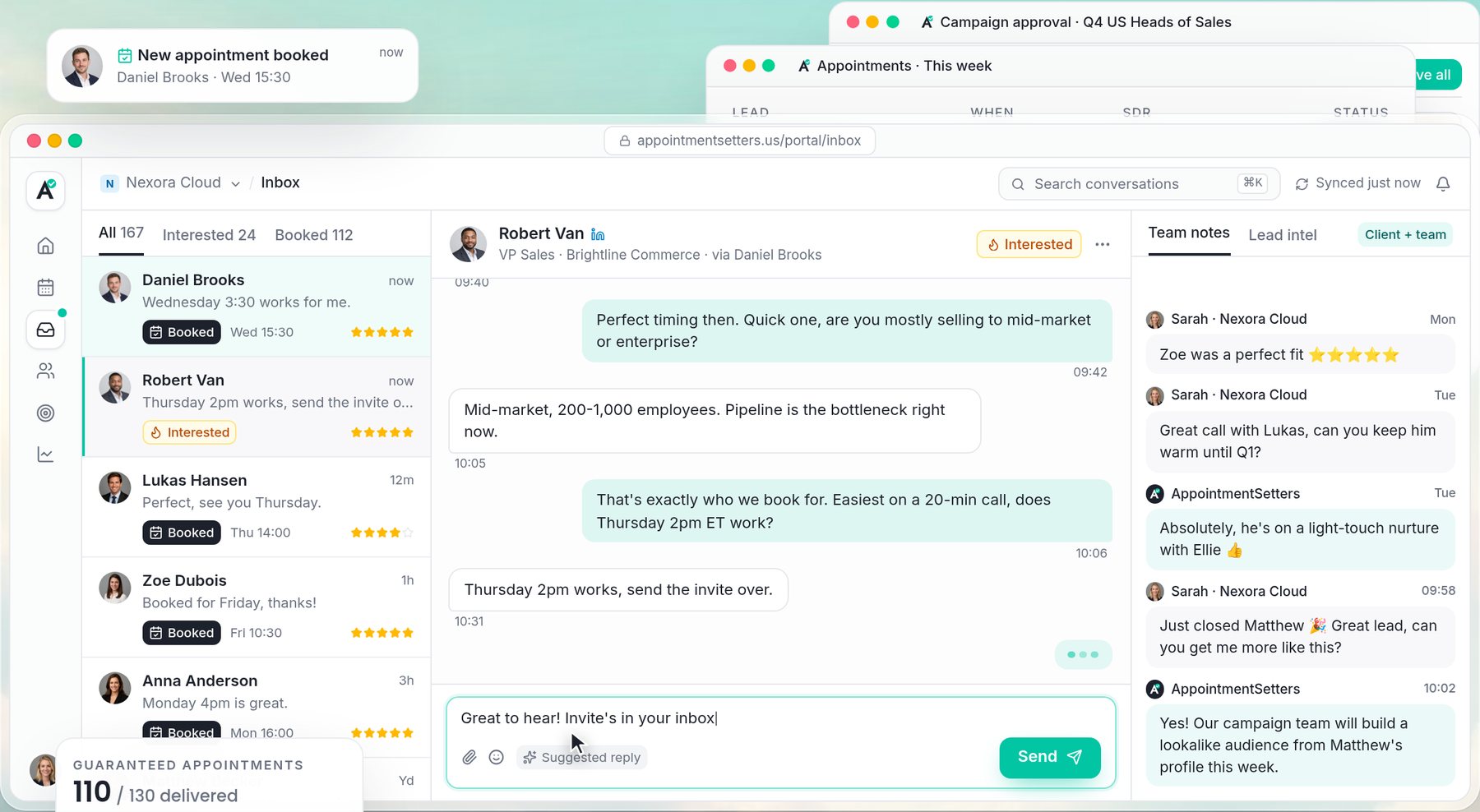
Your Inbox shows the leads that matter: interested prospects, calls being arranged and booked appointments. You can read each conversation, see lead intel, and leave notes for the team. A note like "great call, can you keep them warm until Q1?" goes straight to the SDR handling that lead.
Step 6: The call happens, and you rate it
Booked appointments appear on your Appointments screen with the time, the SDR who booked it and its status. After the call, rate the lead out of five stars and add a sentence of feedback. Only attended calls with prospects who match your approved criteria count towards your package. No-shows are replaced.

Step 7: We optimise every month
Your ratings and feedback feed straight back into list building and messaging. Top rated buyers become seeds for lookalike audiences. Patterns in low ratings tighten the targeting. Every month we build fresh audiences, retire tired ones and test new copy, so the campaign keeps improving.

Step 8: Track delivery against your package
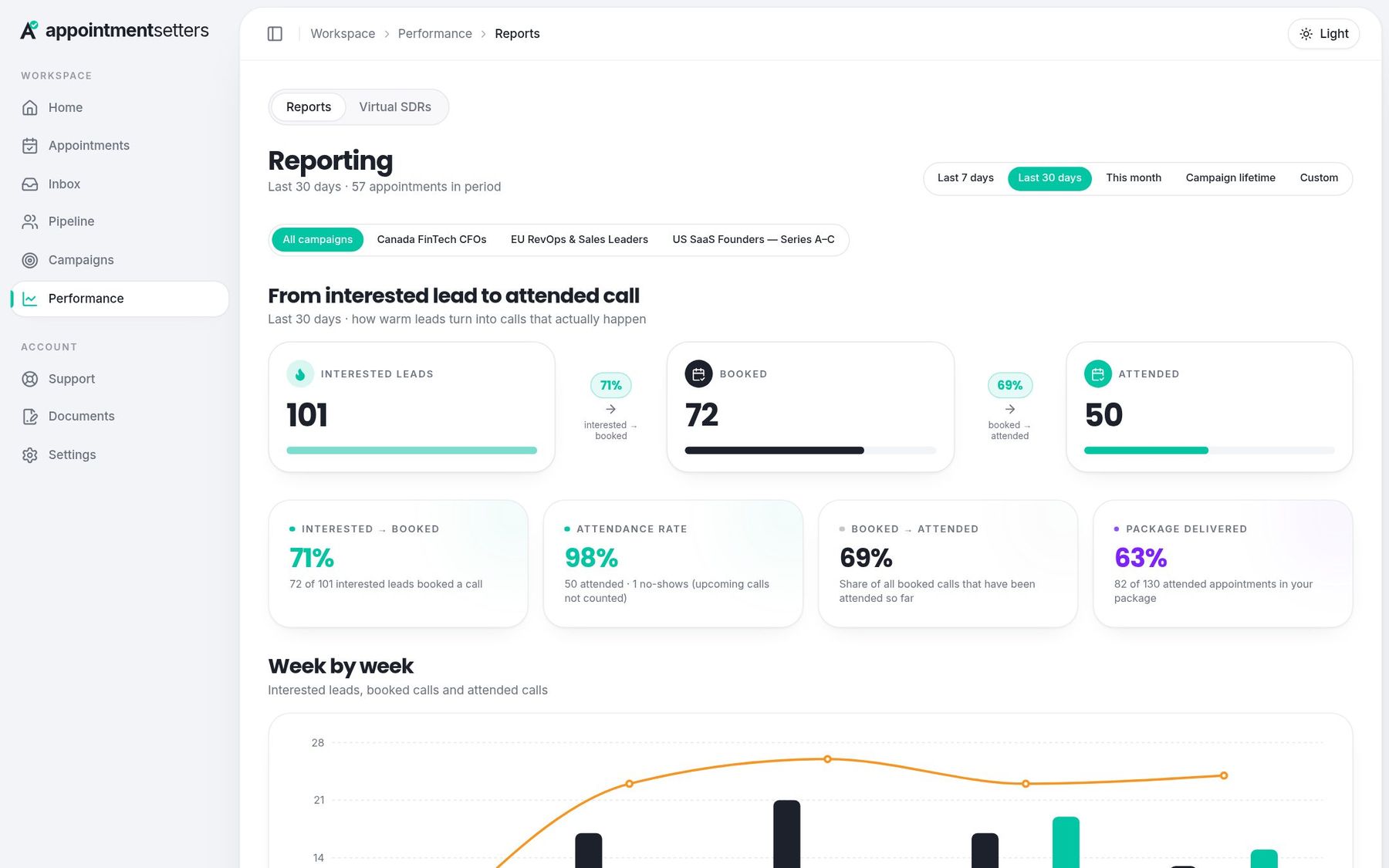
Your home screen and performance report show how many appointments have been delivered against the package you bought, and how leads move from interested to attended. We aim to complete each package within 30 days of launch, and we keep working until the full number is delivered.
Frequently asked questions
Do I need to do anything once the campaign is live?
Turn up to your calls, rate each lead and leave short feedback. You can also read conversations and leave notes for the team whenever you like.
Can I change the messaging after launch?
Yes. Request a change on any message and we will update it and send it back for approval.
Who sends the messages?
Dedicated SDRs on their own LinkedIn accounts. They handle every reply personally.
Appointment setting by region
- B2B appointment setting agency
How our agency model works and what you get in each package.
- B2B appointment setting in the USA
US-focused targeting, time zones and compliance.
- B2B appointment setting in the UK
UK market targeting and GDPR-compliant LinkedIn outreach.
Choose your appointment package
- Starter - 10 attended appointments
$2,500 one-time, $250 per attended appointment.
- Pro - 25 attended appointments
$5,625 one-time, $225 per attended appointment.
- Elite - 50 attended appointments
$10,000 one-time, $200 per attended appointment.