
- LinkedIn prospecting is finding the right buyers on LinkedIn, starting a relevant conversation and moving the interested ones to a sales call.
- Start with a written ideal customer profile and a small, tight Sales Navigator list, not a big generic one.
- Keep the connection request short and about them. Save the offer for the follow up, after they accept.
- Most positive replies come from the follow ups, so plan a sequence of three or four messages spaced a few days apart.
- Measure every stage: accepted, replied, interested, booked and attended. Attended calls are the only number that pays the bills.
LinkedIn is where most B2B buyers keep an up to date record of their job, company and interests. That makes it the most precise place to find decision makers and start a conversation with them. It is also where buyers are most tired of copy and paste pitches. This guide walks through LinkedIn prospecting the way our dedicated SDRs do it every day, step by step, with example messages and the mistakes to avoid.
What is LinkedIn prospecting?
LinkedIn prospecting is the process of finding potential buyers on LinkedIn, starting a relevant conversation with them and moving the interested ones towards a sales call. It usually has four parts: building a targeted list, connecting, following up, and handling replies until a call is booked. Done well, it feels to the buyer like a useful conversation with a real person. Done badly, it feels like spam, and LinkedIn will limit the account.
A simple test for every message you send: would a busy buyer be glad they read it, even if they say no?
Step 1: Write down your ideal customer profile
Before you open LinkedIn, write one page that describes the buyer you want on a call. Be specific enough that two people would build the same list from it:
- Job titles and seniority. The person who owns the problem and the budget, for example Head of Operations, CFO or Founder.
- Company size. Headcount or revenue range where your offer fits best.
- Industry. The two or three industries where you already have results.
- Region. Countries and time zones you can serve and sell into.
- Exclusions. Current customers, competitors, partners and anyone you have already spoken to.
- Qualifying questions. What must be true for a call to be worth your time, such as team size, current tool or timing.
The qualifying questions matter more than most teams expect. They decide which replies become calls, and they stop your calendar filling up with polite people who will never buy.
Step 2: Build a tight list in Sales Navigator
LinkedIn Sales Navigator lets you filter people by current title, seniority, function, company headcount, industry, geography, years in role and more. Use the filters to turn your profile into a saved search, then review the results by hand before anyone is contacted. Remove people who clearly do not fit, even if the filters let them through.
A few practical rules we follow when building lists:
- Keep each list to one buyer type, so the messaging can be specific to them.
- Prefer people who have posted or changed jobs recently. Active members are more likely to see and answer messages.
- Split large markets into smaller lists by region or industry, so you can see which segment responds best.
- Remove existing customers and open deals before every launch.
If you want a deeper walkthrough of the filters, read our Sales Navigator guide.

Step 3: Make the profile worth accepting
Every prospect looks at the sender's profile before they accept. A strong sender profile has a clear headshot, a headline that says who they help and how, an About section written for the buyer, and recent activity. The profile should belong to a real person who will actually run the conversation. Fake or empty profiles get ignored and are against LinkedIn's rules.
Step 4: Send a short connection request
The connection request has one job: to get accepted. It is not the place to pitch. Keep it short, mention something real about the person or their company, and give a light reason to connect. Here are three examples you can adapt:
- Shared focus: "Hi [First name], I work with operations leaders at logistics firms in the Midwest and saw your post on carrier costs. Would be good to connect."
- Role change: "Hi [First name], congratulations on the new role at [Company]. I speak with a lot of new finance leaders in SaaS, happy to connect."
- No note at all: For some audiences, a blank request from a relevant profile is accepted more often than a note. Test both on a small batch.
LinkedIn limits how many invitations an account can send each week and does not publish an exact number. Sending fewer, better targeted invites keeps your acceptance rate up and protects the account.
Step 5: Follow up with a planned sequence
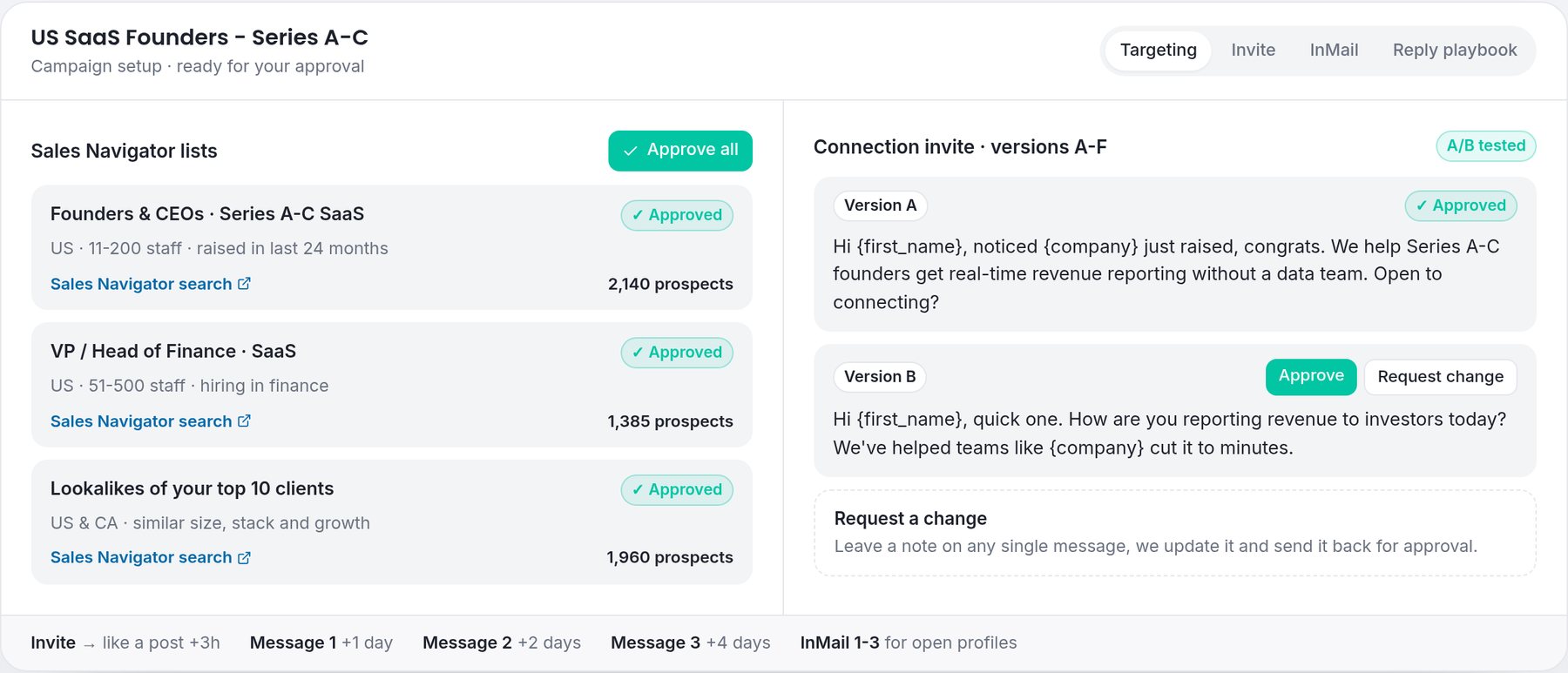
Most interested replies come after the first message, not from it. Plan a sequence of three or four follow ups before you launch, spaced a few days apart, with each message adding something new rather than "just checking in".
- 1Thank you and context (one day after accepting). "Thanks for connecting, [First name]. Out of interest, how are you handling [problem] at [Company] at the moment?"
- 2A useful point (two or three days later). Share one short insight, example or question that shows you understand their world.
- 3The ask (a few days later). "Would a 15 minute call next week make sense to see if [result] is possible for [Company]? If not, no problem at all."
- 4A polite close (a week later). "I will leave it here so I do not crowd your inbox. If [problem] comes up later, I am happy to help."
Liking or commenting on a recent post between messages can also help, as long as the comment is genuine. When someone has not accepted your request, an InMail from Sales Navigator is a second route in. Keep InMails short too, with a clear subject line.
Step 6: Reply fast and qualify before you book
The moment someone replies with interest is the most valuable moment in the whole process, and it is where many teams lose deals. Answer quickly, answer like a person, and ask your qualifying questions before offering times. A good reply to an interested prospect does three things:
- Answers their question directly, in one or two sentences.
- Asks one qualifying question, such as team size or how they handle the problem today.
- Suggests two specific times in their time zone, or shares a booking link if they prefer.
Objections are normal. "Send me some information" usually means "I am not sure yet". Send one short, relevant resource and ask a single question about their situation, rather than a long deck. Our guide on handling sales objections on LinkedIn has more examples.
Step 7: Confirm the call and reduce no-shows
A booked call is not a sales call until the buyer attends. Send a calendar invite straight away with a clear title and agenda, confirm the time zone in writing, and send a short reminder message on LinkedIn the day before. If the prospect cannot make it, reschedule in the same conversation rather than starting again.
This is why we count attended calls rather than booked ones. Our article on attended vs booked appointments explains why the difference matters so much when you are paying for outreach.
The numbers to track
Track each stage separately so you know exactly what to fix:
- Acceptance rate. Low acceptance usually means the list or the sender profile is wrong.
- Reply rate. Low replies after acceptance usually mean the follow ups are too generic.
- Interested replies. If people reply but are not interested, the offer or the audience needs work.
- Booked calls. If interested people do not book, the reply handling or the call to action needs work.
- Attended calls. If booked calls do not happen, tighten confirmations and reminders.
Results vary widely by market, offer and list quality, so treat any benchmark you read online as a rough guide. Your own numbers from a small test are worth more.
Common LinkedIn prospecting mistakes
- Pitching in the connection request.
- Using one message for every industry and job title.
- Sending a long paragraph instead of two or three short lines.
- Stopping after one message.
- Letting interested replies sit for a day.
- Asking for 45 minutes when 15 would do.
- Measuring invites sent instead of calls attended.
A simple daily routine
Consistency beats bursts. A realistic daily routine for one person looks like this: review and clean the next batch of prospects, send that day's connection requests, send scheduled follow ups, answer every reply within working hours, and log the outcome of each conversation. Thirty to sixty focused minutes a day, every working day, will usually outperform a full day once a week.
When to hand LinkedIn prospecting to a team
LinkedIn prospecting is simple to describe and hard to keep up. It takes daily attention, several well run profiles and fast replies, which is difficult for a founder or account executive who also has to sell. That is the gap our service fills. Dedicated SDRs run the outreach on their own LinkedIn accounts, using lists and messages you approve, and they book calls straight into your calendar.
You pay for attended calls with buyers who match criteria you approved, not for activity. The Starter pilot is 10 attended appointments for $2,500, and larger packages lower the price per call. No-shows are replaced, and we keep working until the number you ordered is delivered.
Frequently asked questions
What is LinkedIn prospecting?
LinkedIn prospecting is finding potential buyers on LinkedIn, starting a relevant conversation with them and moving the interested ones to a sales call. It usually covers list building, connection requests, follow ups and reply handling.
Do I need Sales Navigator for LinkedIn prospecting?
You can start without it, but Sales Navigator makes prospecting far more precise. Its filters for title, seniority, company size, industry and region let you build tight lists and save searches, and it adds InMail credits for people who have not accepted your request.
How many follow up messages should I send on LinkedIn?
Plan three or four follow ups after the connection is accepted, spaced a few days apart, with each one adding something new. Stop after that and leave the door open politely.
Should I pitch in a LinkedIn connection request?
No. The connection request should only aim to get accepted, with a short and personal reason to connect. Bring up your offer in the follow ups, once there is a conversation.
How many LinkedIn connection requests can I send per week?
LinkedIn limits weekly invitations and does not publish an exact number. Sending fewer, well targeted requests keeps acceptance rates high and protects the account.
Can someone do LinkedIn prospecting for me?
Yes. With AppointmentSetters, dedicated SDRs run prospecting on their own LinkedIn accounts using lists and messages you approve. You pay per attended appointment, starting with 10 attended appointments for $2,500.
Appointment setting by region
- B2B appointment setting agency
How our agency model works and what you get in each package.
- B2B appointment setting in the USA
US-focused targeting, time zones and compliance.
- B2B appointment setting in the UK
UK market targeting and GDPR-compliant LinkedIn outreach.
Choose your appointment package
- Starter - 10 attended appointments
$2,500 one-time, $250 per attended appointment.
- Pro - 25 attended appointments
$5,625 one-time, $225 per attended appointment.
- Elite - 50 attended appointments
$10,000 one-time, $200 per attended appointment.